How do I export or distribute reports to stakeholders?

Questback reporting can be shared in different ways depending on the audience and the level of access required.

Common options include:

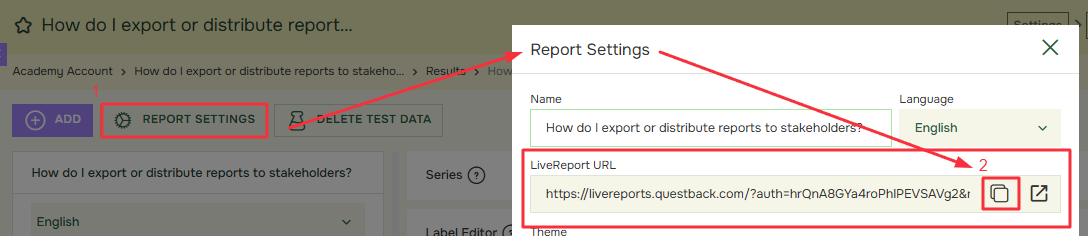
  • LiveReports for continuously updated report access,
  • exported reports for static sharing,
  • report packs for managers or business units,
  • and controlled sharing to HR, programme owners or leaders.


Recommended workflow:

  1. Decide whether the audience needs live access or a static file
    • LiveReports are useful when viewers should always see updated results. Exported files are useful when a snapshot should be shared or archived.
  2. Prepare the report view
    • Before exporting or sharing, check that filters, comparisons, anonymity settings and layout are correct.
  3. Review governance and thresholds
    • Make sure the audience should have access to this level of detail and that Hidden Identity settings are respected.
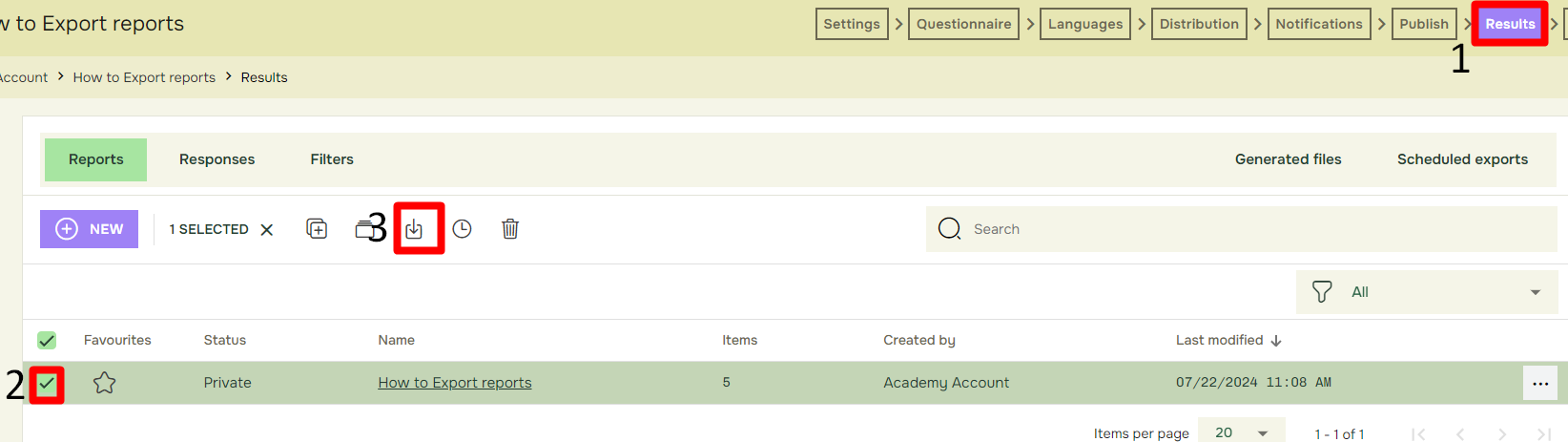
  4. Export or share
    • Use the relevant export file or share via the live link
  5. Test the final output
    • Open the exported file or report link as the intended user would receive it.
  6. Repeat systematically for multiple audiences
    • If many managers or units need reports, create a master report and then batch copy it with the corresponding filters for the corresponding audiences


Related articles:


academy

Tietoja Academysta

Löysitkö vastauksen kysymykseesi? Dokumentaation alla on informatiivisia kuvauksia, jotka auttavat sinua ymmärtämään Essentialin toimintoja ja käyttämään niitä. Palautustyön avulla nostat tietotasoa koko organisaatiossa.