How do I export or distribute reports to stakeholders?

Questback reporting can be shared in different ways depending on the audience and the level of access required.

Common options include:

  • LiveReports for continuously updated report access
  • exported reports for static sharing
  • report packs for managers or business units


Recommended workflow:

  1. Decide whether the audience needs live access or a static file
    • LiveReports are useful when viewers should always see updated results. Exported files are useful when a snapshot should be shared or archived.
  2. Prepare the report view
    • Before exporting or sharing, check that filters, comparisons, anonymity settings and layout are correct.
  3. Review governance and thresholds
    • Make sure the audience should have access to this level of detail and that Hidden Identity settings are respected.
  4. Export or share
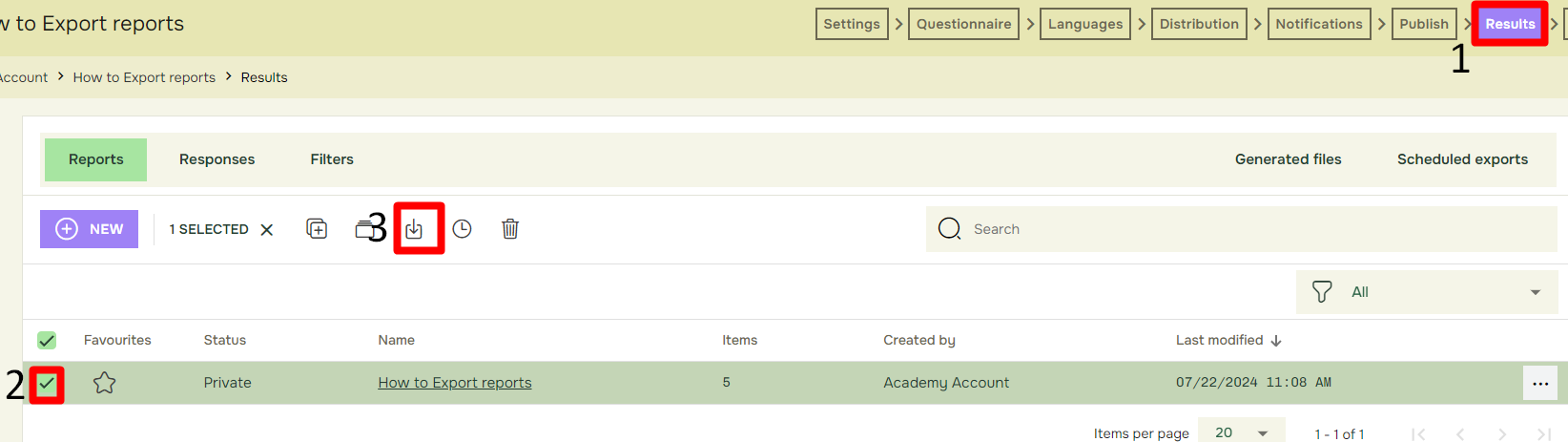
    • Export the report by going to results (1) selecting the desired report (2)  and then clicking on the export icon (3). In the next window you can select the desired output format e.g. pdf, excel, etc.
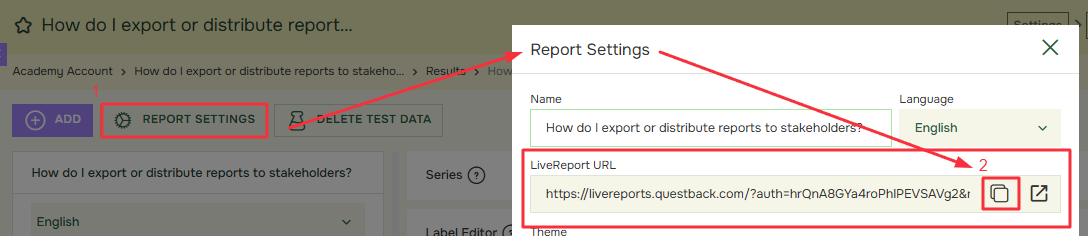
    • Share the live link (you can choose to password protect the link) by going to report settings (1) and then clicking on the copy item (2)
  5. Test the final output
    • Open the exported file or report link as the intended user would receive it.
  6. Repeat systematically for multiple audiences
    • If many managers or units need reports, create a master report and then batch copy it with the corresponding filters for the corresponding audiences. You can download an Excel sheet with the different links for the different report for easy sharing.

Related articles:


academy

Om Academy

Hittade du svaret på din fråga? Under dokumentation finns informativa beskrivningar som hjälper dig förstå och kunna använda Essentials funktionalitet fullt ut. Genom insiktsarbete höjer du kunskapsnivån i hela organisationen.