Om Academy
Hittade du svaret på din fråga? Under dokumentation finns informativa beskrivningar som hjälper dig förstå och kunna använda Essentials funktionalitet fullt ut. Genom insiktsarbete höjer du kunskapsnivån i hela organisationen.
You can compare results over time in different ways depending on how your Quest programme is structured.
Use the below decision logic in order to determine that works best for you and your survey needs.
Option 1: Compare periods inside one ongoing Quest
Use this when the same Quest stays open over time and responses are collected continuously or repeatedly.
Typical setup:
This is useful when you want to compare monthly, quarterly or yearly periods inside the same Quest.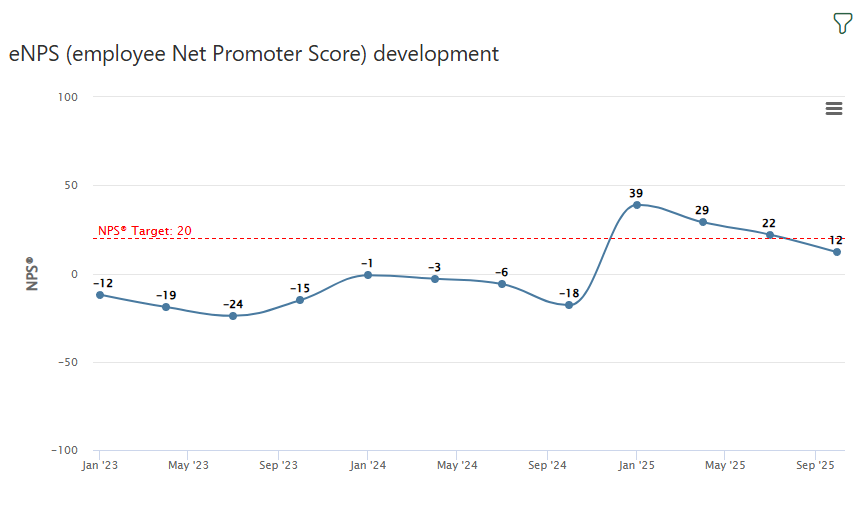
Option 2: Compare copied Quests
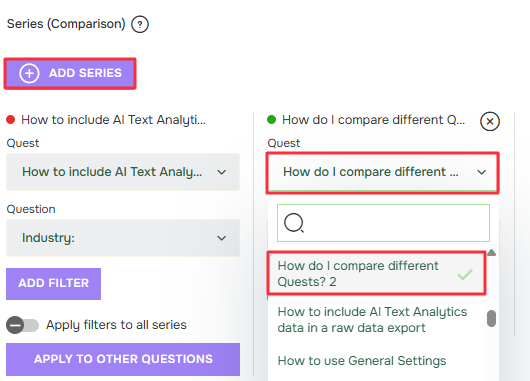
Use this when each wave is a separate Quest.
Typical setup:
This is useful when you want each wave to have its own clean dataset but still compare results later.
Before doing any comparisons check:
Related articles:

Hittade du svaret på din fråga? Under dokumentation finns informativa beskrivningar som hjälper dig förstå och kunna använda Essentials funktionalitet fullt ut. Genom insiktsarbete höjer du kunskapsnivån i hela organisationen.