How do I generate report packs for many managers, teams or business units?

When many managers, teams or business units need similar reports, it is usually best to create one reporting master and then reuse it systematically.
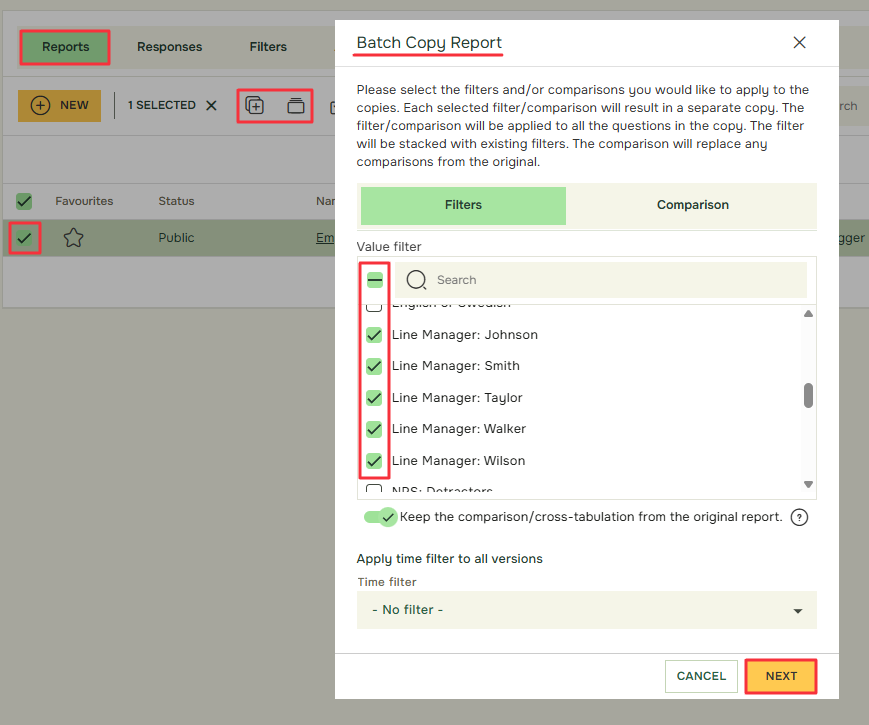
Recommended workflow:

  1. Define the reporting audiences
    • Decide whether you need reports for managers, departments, countries, locations, cohorts or project owners.
  2. Build one reporting master
    • Create the first report with the KPIs, summaries, text views, comparisons and layout you want to reuse.
  3. Decide whether to use one filtered report or multiple report copies
    • A LiveReport with filters may be enough in some cases. In other cases, separate report copies are easier to distribute.
  4. Create the subgroup logic
    • Use respondent data, value filters and comparisons to create the right view for each audience.
  5. Reuse report structure at scale
    • Use report copies, batch comparison or other repeatable report-building methods where available.
  6. Check Hidden Identity and thresholds
    • Make sure each audience sees only what should be visible and that small groups are handled safely.
  7. Quality-check the report pack
    • Before sharing, test a sample of reports for layout, filtering, thresholds and access.
  8. Distribute the report pack
    • Share LiveReports or exported reports with the relevant report viewers.


Related articles:


academy

Om Academy

Finner du svaret på spørsmålet ditt? Under dokumentasjonen er det informative beskrivelser som hjelper deg å forstå og kunne bruke Essentials funksjonalitet. Gjennom innsiktsarbeid hever du kunnskapsnivået i hele organisasjonen.